

Trendyol GO is an instant delivery platform developed by the Trendyol Team. It currently provides meal and grocery delivery services via Trendyol Mobile App under the names of Trendyol Yemek and Trendyol Market. The project was kicked off in February 2020 and launched -only two months later- in April 2020 for a small area in Istanbul. The system is currently active across the country with 81 cities and at the time of writing this post, in 20 of them, nearly 18K Trendyol GO couriers were operating for this platform.
The Trendyol GO Team stands out with its high level of seniority. Many team members specialize in specific fields such as Geospatial Data Processing, Algorithms, Domain-Driven Design, Continuous Delivery, Testing, Agile, Extreme Programming, Micro/Nano Services Based Architecture, etc.
Quality Assurance is another vital topic for Trendyol GO. Testing practices at different levels, such as Unit Testing, Integration Testing, Contract Testing, and Load Testing are successfully implemented to serve this purpose. Along with all these practices, Automated Testing, which is the main focus of this article, is another testing practice to which the team attaches great importance.
When we say the automated testing pipeline, we are talking about the acceptance tests running automatically in the CI/CD pipeline right before the project is deployed to production. To build such a structure, firstly, we need to write a single acceptance test and be able to run it manually. After seeing it passed successfully, create a test suite and call it from the CI/CD pipeline. This is simply the way we followed when we first launched our automated testing pipeline. Today, hundreds of acceptance tests are running in our pipelines for different projects, and the number is growing every day as new features are implemented.
In this article, we want to share our learnings and the solutions to some common problems we faced in building our automated testing pipeline for Trendyol GO Finance Domain. Please note that for the sake of simplicity, this article’s goal is not to provide all the configurations and the details needed to establish such a pipeline.
Motivations
“All code is guilty until proven innocent.” – Anonymous
Low error tolerance for financial processes. Trendyol GO Finance Domain has a very low error tolerance since it processes the financial data. Any error with the calculations, even at the decimal level, can be very difficult to identify and quite problematic in terms of the financial reports.
Difficulties with manual testing in the staging environment. The staging environment can be hard to organize when multiple people work on it at the same time. Since the data is highly relational, even a minor change done by someone else can affect the manual testing process on the other side and mislead us about the test results. Any development bug with a dependent service can also easily block our manual testing processes. For this reason, manual testing in the staging environment often becomes time-consuming and difficult to perform.
Regression test load. It is vital that confirming a recent change in the code doesn’t break the existing features. This is a common and usually repetitive process and can be, again, highly time-consuming when it comes to manual testing.
Dependency on other services. Trendyol GO Finance Domain works with the data provided by the associated services and is in either synchronous or asynchronous communication with these services. For example, In most scenarios, it is needed to run the courier assignment, and order delivery flows on the dependent services first. Following these actions, events are consumed and processed by Allowance API, and earning calculations are made. To receive these events, we have to run these flows on the other services every time. And this creates a serious and unnecessary burden for our test processes.
Another example would be the Rest API calls that Allowance API makes to the other services, such as SAP, Logo, Courier API, etc. In such test flows, it becomes quite difficult to manipulate these services to make them return expected responses.
In the staging/testing environment, such dependencies may also become a blocker in case of a network problem or a bug in one of these services. This may stop the testing process completely and eventually delays deployments to production.
Distributing test load (cross-functional team). An average scrum team usually has 4 or 5 software developers, while it has only one or at most two QA engineers. And in some cases, it may be challenging for a QA engineer to keep up with the speed of the development process, which usually causes a bottleneck in the testing phase. In cross-functional teams, the software developers also participate in testing processes. Having automated testing is a factor that expands this participation.
Reducing the manual testing processes in the long term. The ultimate goal is to move to continuous deployment and minimize manual operations as much as possible.
Solutions
Setting up a new environment for automated testing. Manual testing and automated testing are two different concepts. While the staging environment serves manual testing purposes, it will be ideal to have a completely different environment for automated testing since it requires a more predictable and stable test environment. For this reason, we set up a new, production-like Kubernetes cluster with all the needed applications deployed.
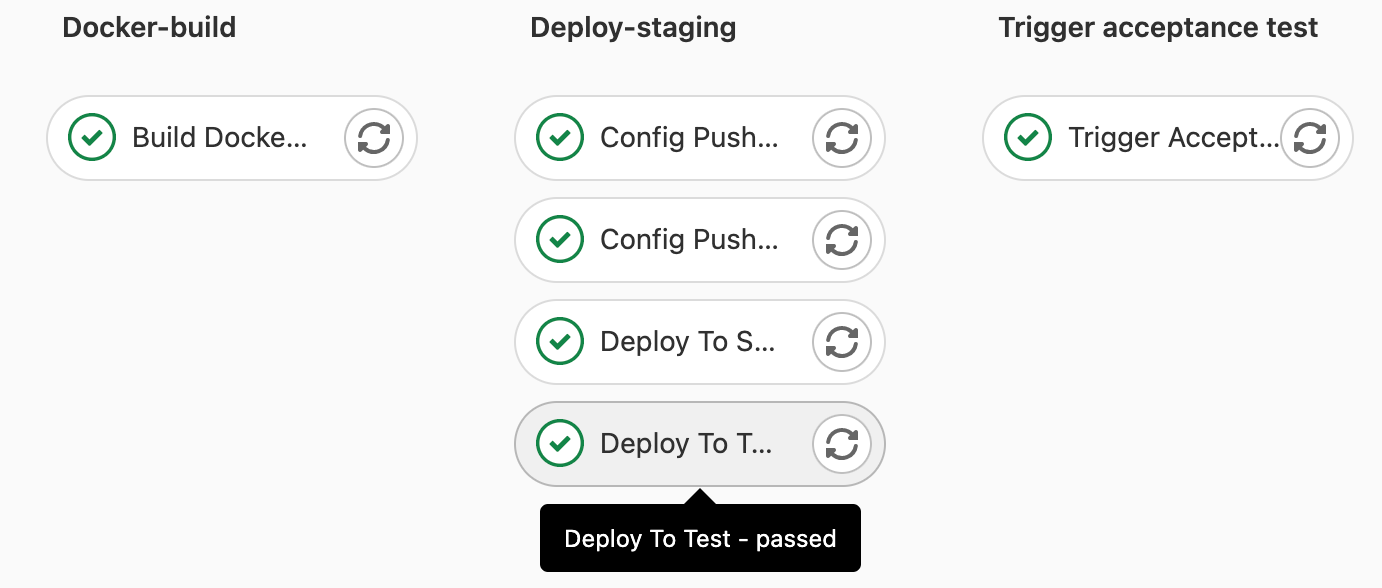
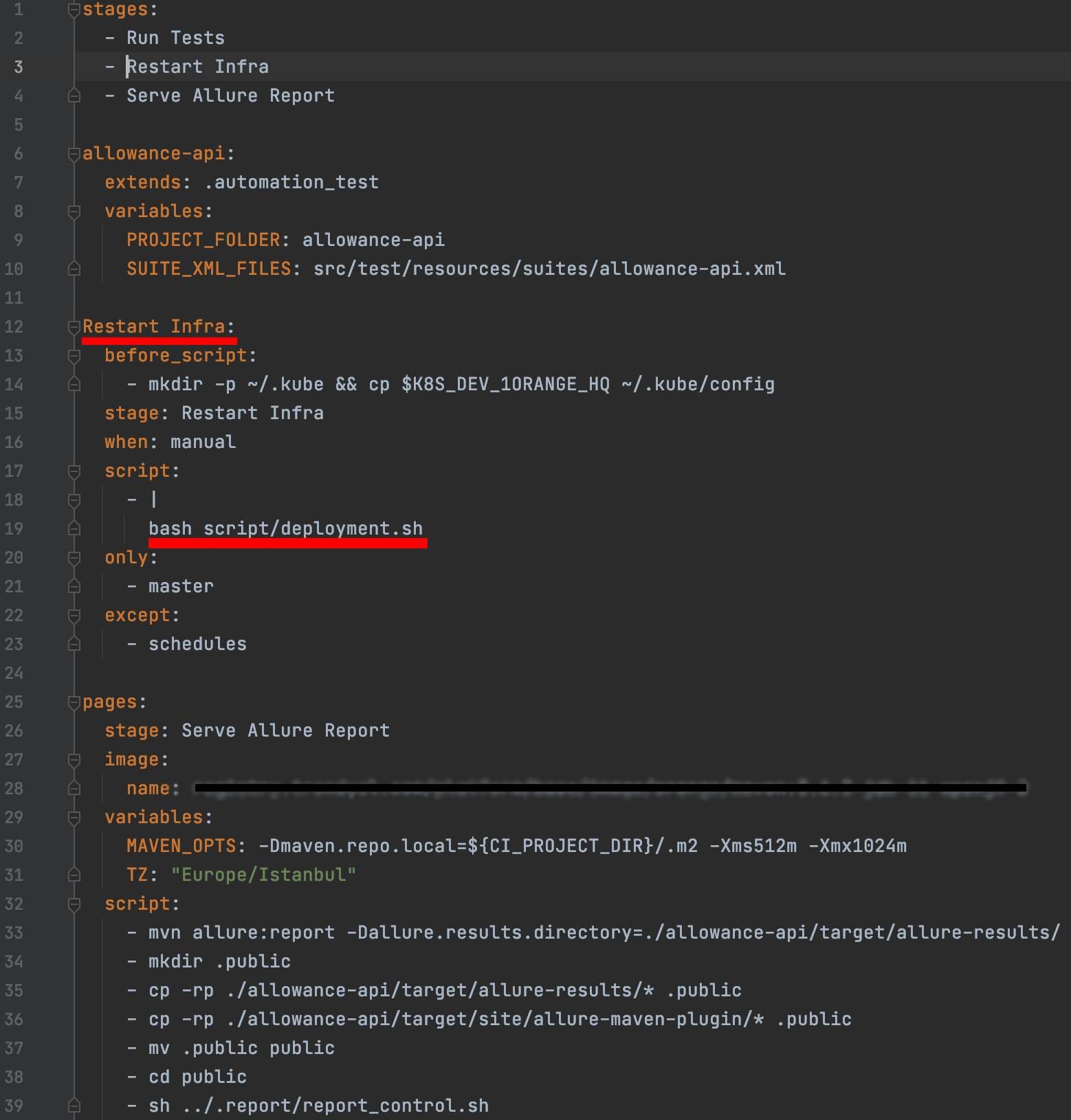
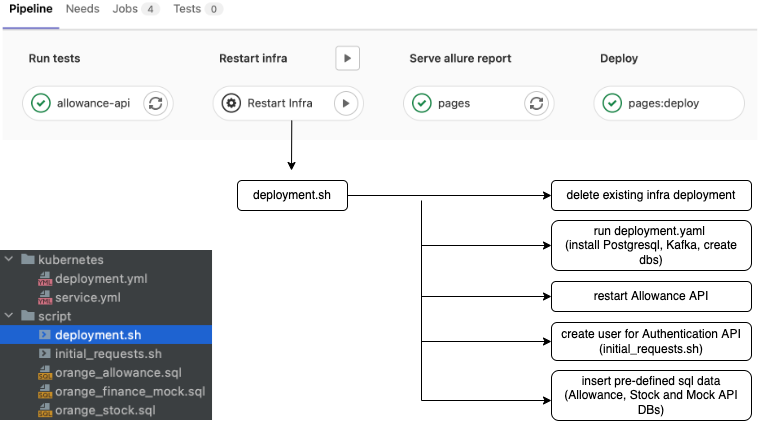
Isolate/containerize infrastructural dependencies. A new environment requires its own dedicated database, message broker, distributed caching provider, etc. To reduce our dependency on platform teams (dba, devops, etc.), we decided to containerize and manage our infrastructural concerns on our own and deploy them on the test environment (Kubernetes cluster) as the other applications. For this purpose, we made the following configurations in our automated testing project.
Create an API for mocking purposes. As mentioned above, our dependency on the associated services is one of the biggest challenges when testing our system. To overcome this, we have created an open-source solution (Mockidoki) to mock our dependencies both for message-based and Restful communications. Here are the examples showing the basic use of Mockidoki;
Mocking Kafka Events
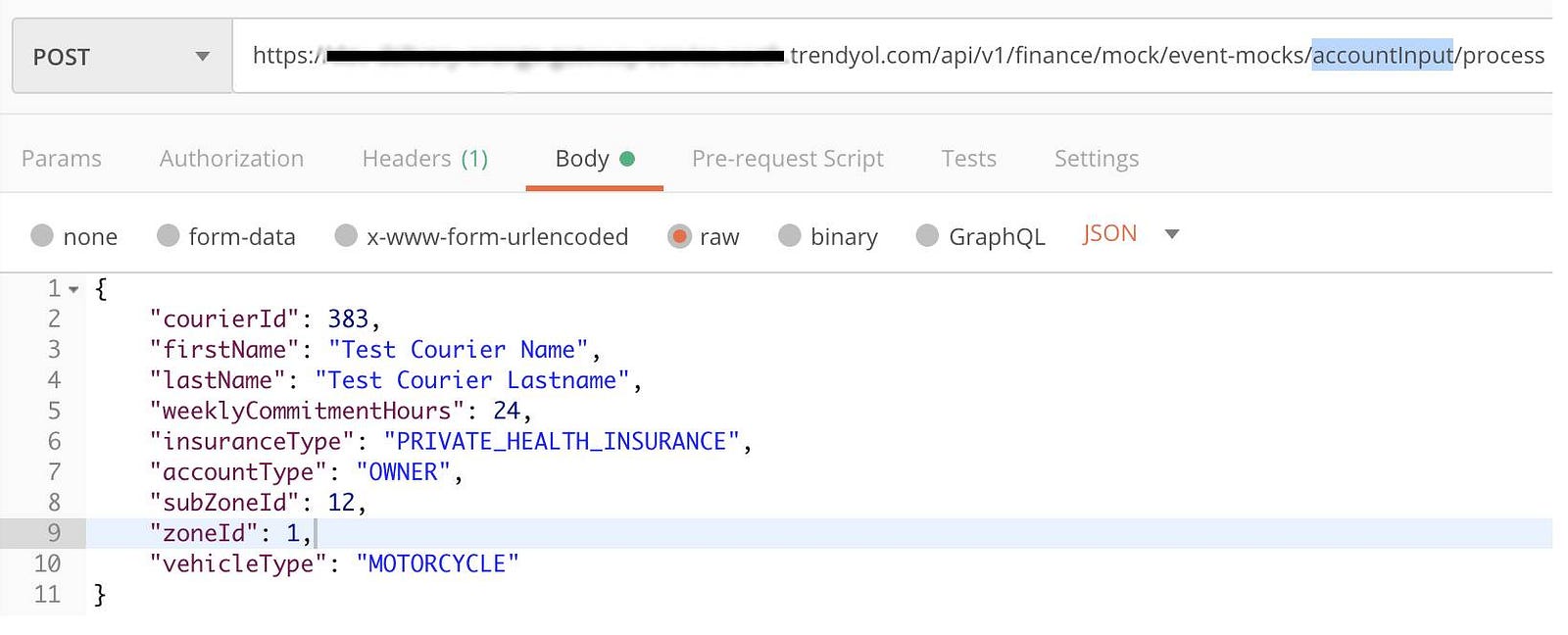
In the picture above, the JSON payload provided in the request body is published on the Kafka topic to which the key (accountInput) refers. In a real-world example this call is made from within the automated tests, and the message is consumed by Allowance API as if Courier API sends it.

Mocking HTTP Requests
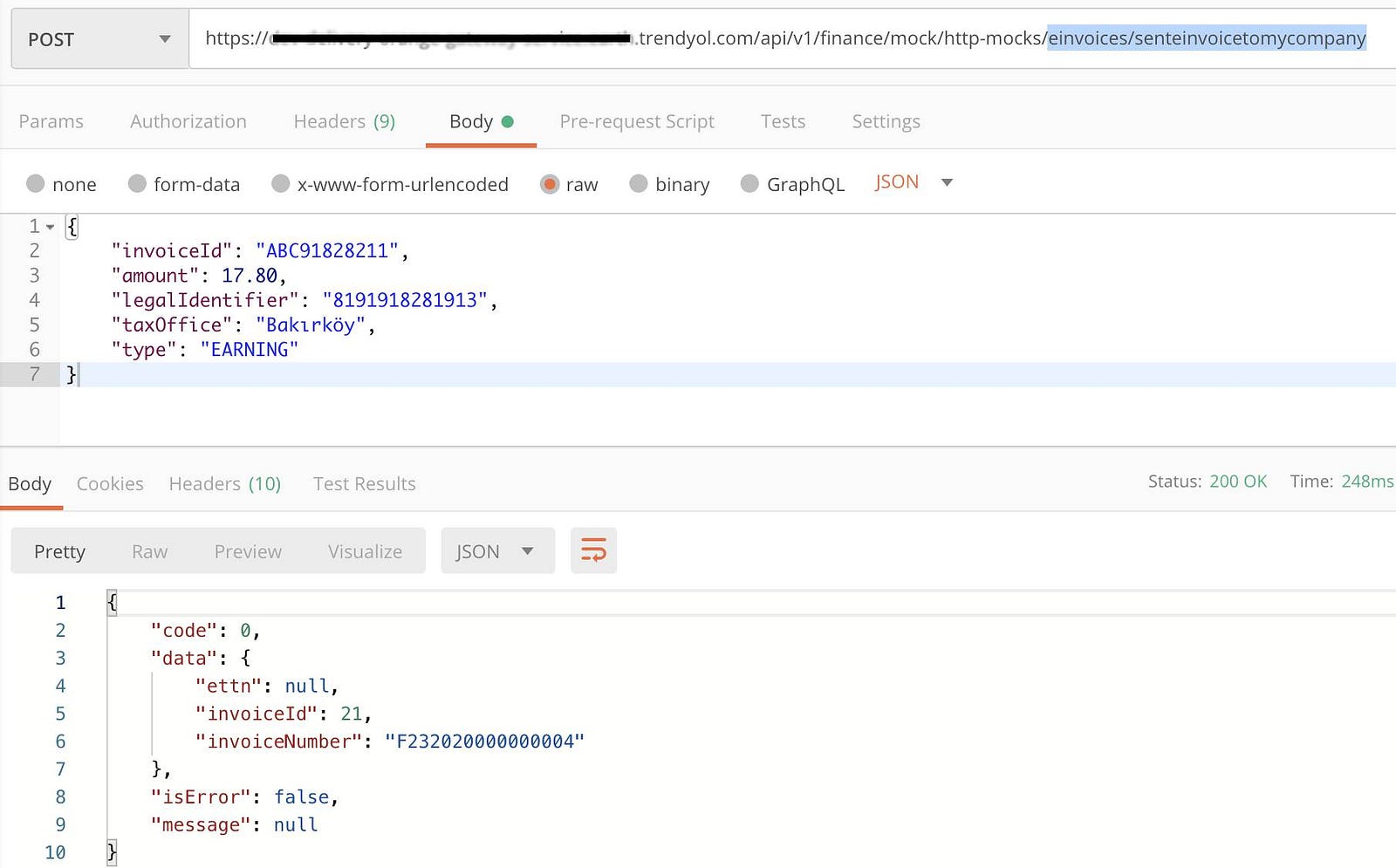
HTTP request mocking mechanism checks for the provided URL path, HTTP method, request header and request body within the pre-defined mock data and returns the matched response to the client if there is any.
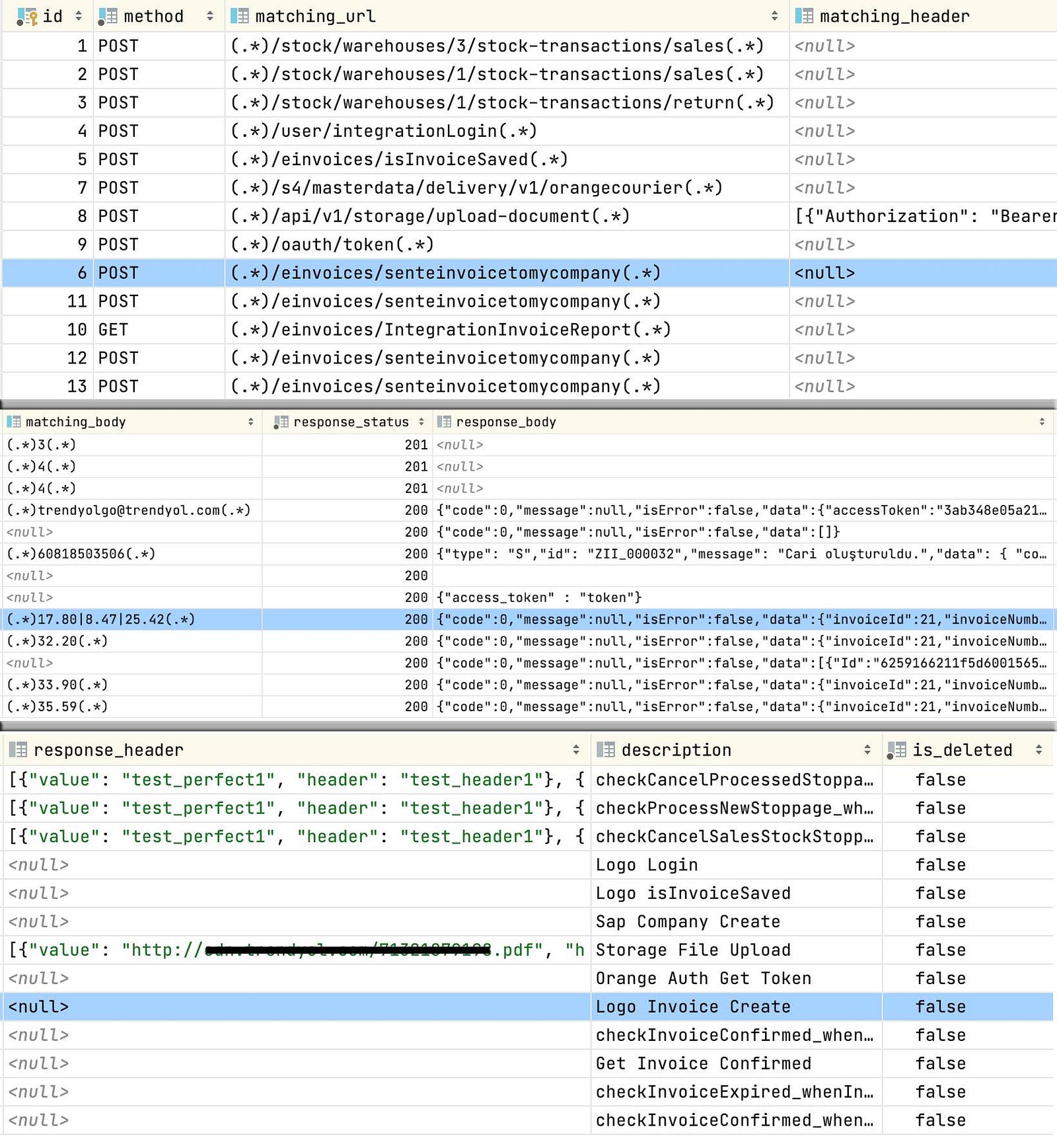
As a result, we have also achieved a serious performance increase by mocking our dependencies. We have reduced an average test running time from ~2 min. to ~10 sec.
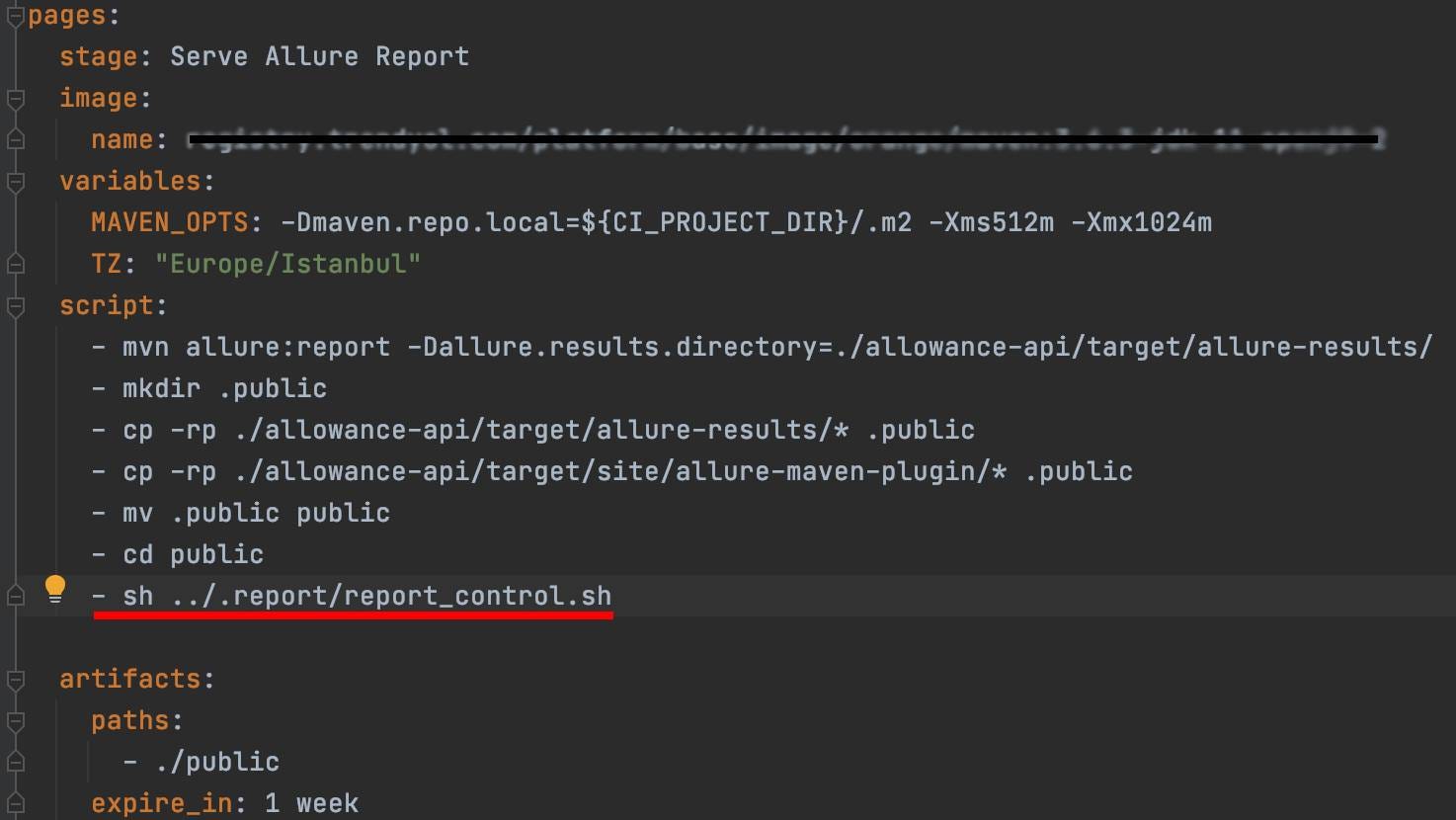
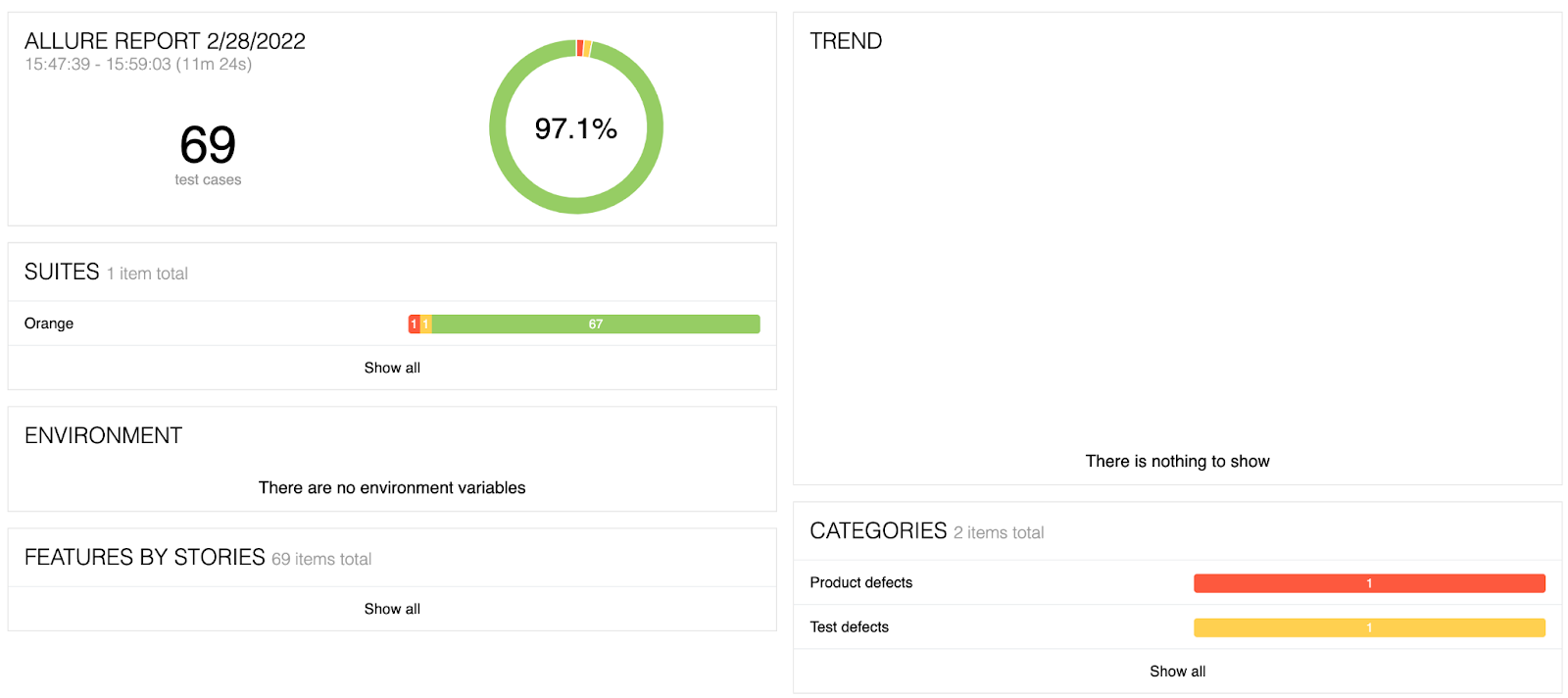
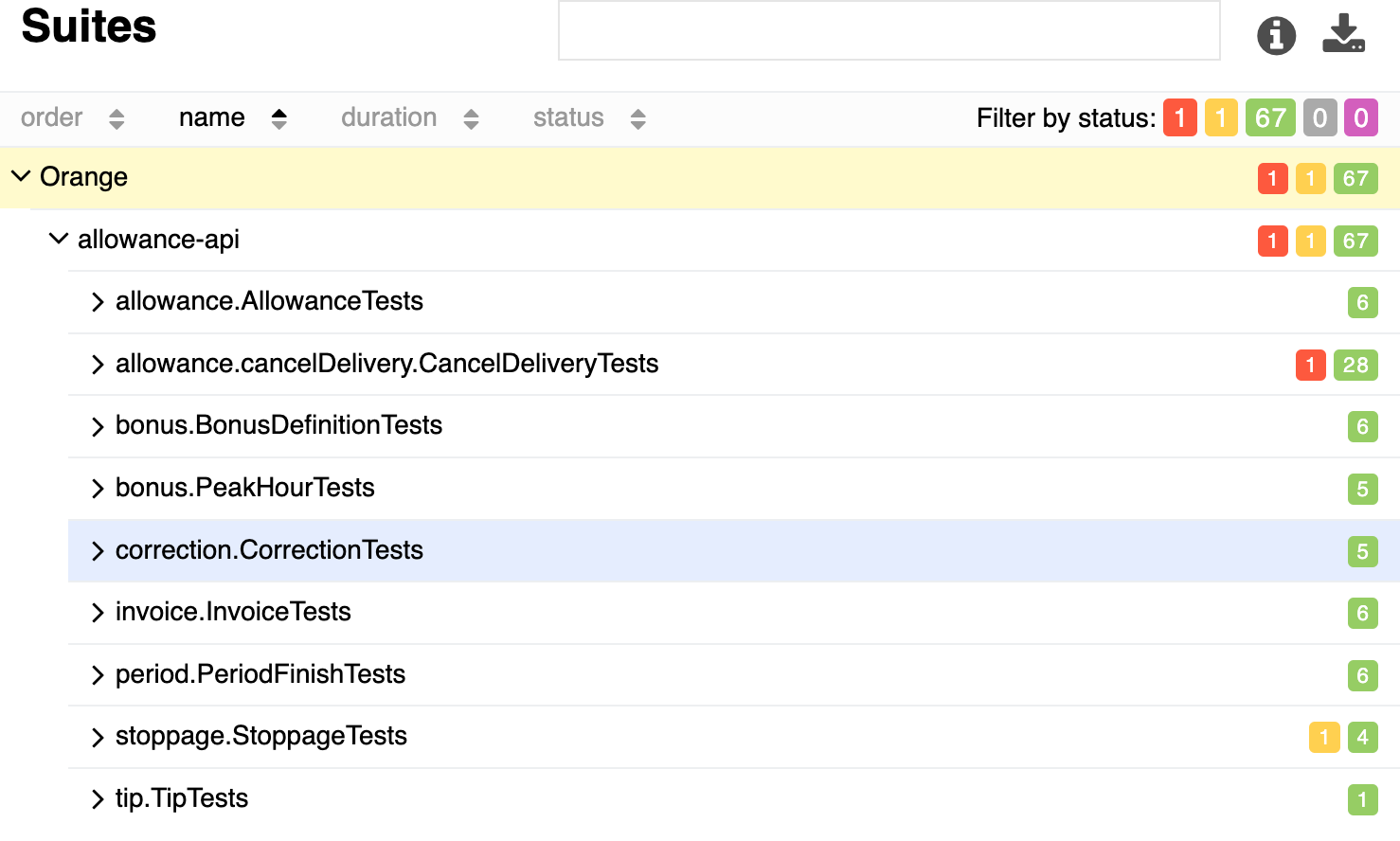
Use Allure Report to visualize test results. Allure Report is a test result visualization tool that gives a clear representation of what has been tested. It supports multiple languages. Since our automated testing project is written in Java, we have added the required dependencies in our pom.xml file to be able to use it and made the following configurations in our Gitlab-ci.yaml file.
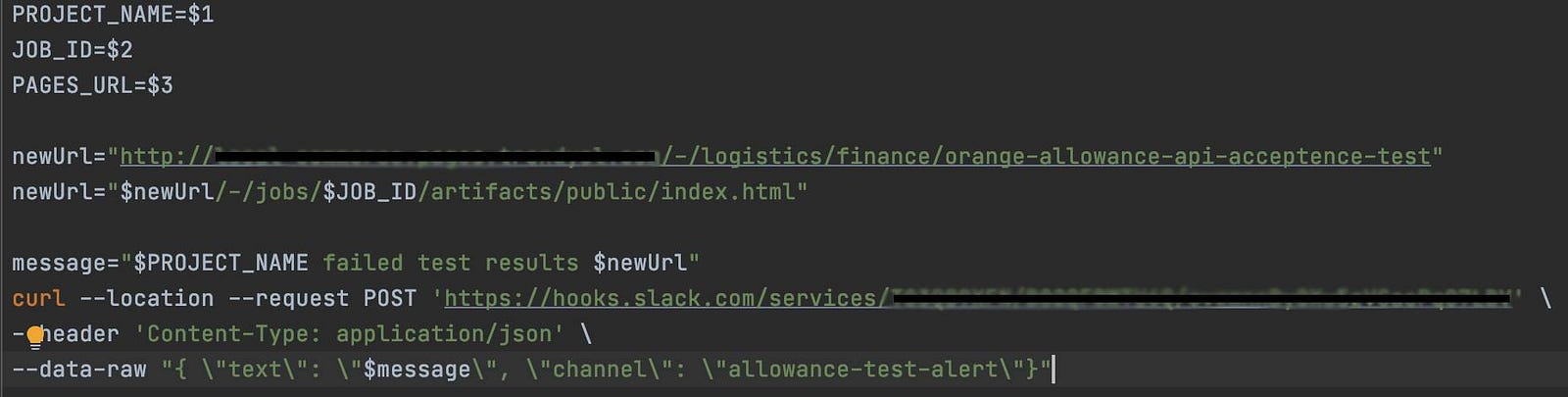
Configure a Slack channel for automated test results. We have created a new Slack alert channel to notify the team as quickly as possible when the tests running in the pipeline fail. And by making the necessary configurations, we had the pipeline send the test results to this channel.


Significant Outcomes
No major incident for the last eight months. There have been some times when our automated testing pipeline failed because of some newly pushed commits that break the existing code. This has prevented us from deploying bad releases and causing potential incidents in the production environment. Succeeding this was, in fact, our first and biggest motivation at the beginning of this journey.
Lower time cost when writing automated tests. As another outcome, we have noticed that in most cases, writing an automated test takes less time compared to performing it manually. Although this was not one of our main motivations, we have saved a significant amount of time in our testing processes.
Faster action for development bugs. As software developers, one of the most unpleasant things for us would be to go back to the task we committed a day or two ago, pause the one we are currently working on, and try to investigate the problem that the tester has found with it. Changing context and getting focused on your previous task again is a time-consuming and demotivating effort. Working cross-functional and writing the automated tests for the scenarios specified by the tester within the task is now the way we work. This helps the developers to notice the potential bugs in the first place. It also applies to the existing automated tests. If your recent code breaks them, you have a chance to fix the problem immediately while you are still working on the task.
Role of a Tester
So, what is the role of a tester (and a developer in test) when all the tests are automated?
“Automation does not do what testers used to do, unless one ignores most things a tester really does. Automated testing is useful for extending the reach of the testers work, not to replace it.” – James Bach
Well, there are two important points we need to keep in mind. Automated testing is not a complete replacement for manual testing, and a developer in test has a significant role in automated testing processes.
It’s mainly the responsibility of testers to identify what test should be automated and what not. For example; we would not write an automated test for a simple CRUD process that runs no business and can be covered with a simple integration test. In such cases, in addition to the integration tests, we perform manual testing to assure the processes.
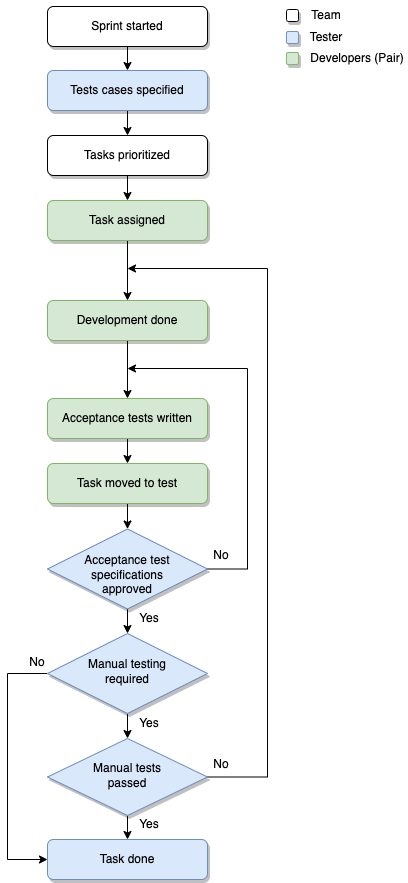
It’s also the responsibility of testers to come up with the necessary acceptance testing scenarios for a given task. So that the developers working on the task can follow through and write the scripts.
A developer in test is a coder after all. He/She writes code and contributes to writing automated tests as well. This could be as pair programming with a software developer, writing a list of missing automated acceptance tests retrospectively, etc.
Another important responsibility for a developer in test would be ensuring the quality of the tests written by the software developers, reviewing each test, and making sure that work exactly as stated in the testing scenarios.
In addition to all these, there are a lot of other activities testers can perform such as exploratory testing, tests requiring human input or visual interaction (e.g. Captcha), tests requiring the evaluation of user experience, tests for temporary features, etc.
Role of a Developer
As we mentioned above, the testers identify the test cases, and the developers write code and make them pass according to the specifications stated by the testers. This also helps developers to understand the end-user perspective better.
Testing scenarios are usually specified right after the Refinement (Grooming) sessions or at the beginning of a sprint in a Scrum team. We as the team prioritize the tasks and consider starting with the ones sized small or that require higher manual testing effort first if possible. Our motivation here is not to cause a bottleneck for the testing processes on the last day of the sprint.
Software developers are coding experts. And an acceptance test project is not much different than an API, a mobile application, etc. It’s all about coding. No matter if you use a testing tool like Cucumber or a framework like TestNG, you will still have to write some code, deploy it and consider the coding fundamentals such as clean code, single responsibility, extendibility, maintainability, etc. It is the developers who are responsible for sustaining the code quality and the health of the entire project.
Besides the test project itself, the environment that the project runs in is another important responsibility for the developers. A stable and reliable testing environment with the highest possible up-time is a significant indicator of a successful automated testing implementation.
Thanks for reading 🙂